
WHAT’S THE LITTLE DIAL ON YOUR SANDER FOR?
Sanding speed can make the difference between a flawless surface and ugly pigtail scratches. This guide explains how to balance sander RPMs with hand movement for smoother, cleaner results every time.
Some folks like sanding, others consider it the worst part of the project. Whichever side you fall on, it’s important to know how to do it properly, because sanding can make or break your project. You don’t want to spend all that time and money only to wind up with something that looks terrible because of poor sanding technique.
Recently, I shared all about sanding, packed with tips and tricks to improve your work no matter how many years you’ve been in the shop. But one question it didn’t fully answer concerns sanding speeds—specifically how you should use the variable speed feature on your orbital sander.
This is an important subject. Uneven surfaces and those awful pigtail scratches may be related to the speed at which you sand. And the wrong speed can even ruin some materials. So understanding how sanding speeds affect your work can be a key factor in a successful project.
Sanding Speed: Two Factors
It’s important to remember that sanding speed is a combination of two things:
The rate at which the sanding disc spins.
The rate at which you move the sander across the surface.
Here are two of the sanders I use in my shop:
DeWalt: Variable speed dial from 1–6. At 1, it runs about 8,000 RPM; at 6, about 12,000 RPM. Each number adds or subtracts about 700 RPM.
Ridgid: Runs between 7,000 and 12,000 RPM, so each dial number changes speed by about 800 RPM.
Now, those numbers don’t mean the disc itself spins at 12,000 RPM. The pad orbits in a tiny circle 12,000 times per minute while the disc rotates at a slower rate—that randomness is what makes it a random orbit sander.
The faster the disc moves, the more the grit cuts into the wood fibers at any given spot. For example, if you held the sander stationary at its lowest setting (8,000 RPM) for a full minute, the grit will pass over the wood 8,000 times. Do that long enough, and you’d carve out a circle-shaped depression in the board. Instead, if you move it across the board for a minute, those 8,000 orbits get spread out. Maybe the grit only passes over each section 1,000 times instead.
Slow down your passes, and you remove more material. Speed up your passes, and you remove less. Increase motor speed, and you can make up for faster hand movement.
In other words: your arm makes every sander “variable speed.”
Why Bother with Variable Speed Sanders?
Not all sanders even have a variable speed dial—many woodworkers don’t find it necessary. But let’s say you could only pick one speed to leave your sander on for most jobs. What would it be?
Most people guess the middle setting. On my DeWalt, that’s about 10,000 RPM. But here’s something interesting: the single-speed version of that same DeWalt sander runs at 12,000 RPM—the highest setting on the variable speed model.
So DeWalt is essentially saying: for most situations, full speed ahead.
Common Concerns
Won’t 12,000 RPM overheat my sandpaper?
Not if you’re sanding correctly. The only pressure you should apply is the weight of your hand. Pressing down too hard disrupts the disc’s random orbit, overheats the paper, and destroys it quickly. But with light pressure, even 12,000 RPM won’t overheat quality sandpaper.
So why slow it down at all?
There are situations where a slower speed can help:
Very coarse grits remove material quickly—slowing the sander slightly gives you more control.
Veneers or plywood—reducing speed minimizes the risk of sanding through the thin surface layer.
The key: only drop one or two numbers on the dial. Too slow, and you risk forming pigtails.
The Problem with Pigtails
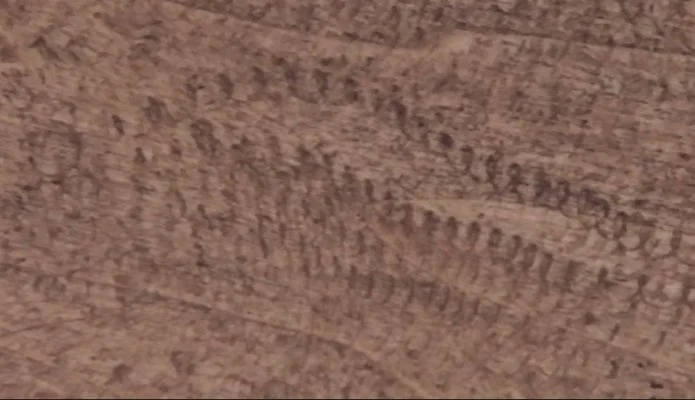
Pigtails are the bane of random orbit sanders. They can be caused by:
Grit stuck under the sanding disc.
Poor dust collection.
Improper sanding speeds.
At proper speed, the tiny spiral scratch pattern overlaps so much that it’s invisible. But slow down the orbit too much, and those spirals stretch out, becoming visible. That’s when you get pigtails.
For this reason, I almost never use the lowest speed settings. Some people say they’re for sanding between coats of paint or finish, but I don’t use an electric sander for that—at least not on furniture.
The Right Movement Speed
If you’re running your sander at 10–12,000 RPM, what about your hand speed?
Moving too quickly can leave visible swirl marks just like slowing the motor down too much. The proper rate is about 1 inch per second.
That may feel painfully slow if you’re used to buzzing back and forth, but once you adjust, you’ll see a huge improvement in your finish quality.
Final Thoughts
The two factors—motor speed and hand speed—work together. Keep your sander at a higher setting (10–12K RPM), apply only light pressure, and move at a slow, steady pace (about 1 inch per second). Do this, and you’ll drastically reduce pigtails, swirls, and uneven sanding.
Sanding might not be the most exciting part of woodworking, but getting it right ensures your hard work truly shines.
This post may contain affiliate links. If you make a purchase, we may receive a small commission.
Need some cool tools for your shop? Browse my Amazon Storefront for inspiration.
